
SAP HANA Calculation Views are one of the most important components in modern SAP reporting and analytics solutions. A well-designed Calculation View can significantly improve performance, reduce memory consumption, and simplify reporting logic. However, poor modeling practices can lead to slow execution, duplicate records, unnecessary memory usage, and difficult maintenance.
In this blog, I would like to share some practical best practices and real-time learnings that I have personally used during SAP HANA development projects. These points are not just theoretical recommendations — they come from actual project experience while working on complex graphical Calculation Views.
In this Blog, I just shared my experience with the on premise version with the calculation views.
1. Always Create Projection Nodes with Only Required Columns
One of the most common mistakes in Calculation Views is selecting all columns from the source table even when only a few are required.
Best Practice
Always create Projection Nodes with only the required fields from the source table.
Why?
- Reduces memory consumption
- Improves execution performance
- Simplifies the data model
- Reduces unnecessary data movement
Even if columns are not displayed in the final output:
- SAP HANA still processes them internally
- Memory consumption increases
- Execution becomes slower
Always keep the model clean and lightweight.
Avoid
Fetching technical or unused columns into higher nodes.
The smaller the dataset moving across nodes, the faster the Calculation View performs.

2. Create Calculated Columns in Projection Nodes Instead of Join Nodes
Calculated columns are unavoidable in many business scenarios. However, where you create them matters a lot.
Best Practice
Whenever possible, create Calculated Columns in the Projection Node itself rather than in Join Nodes.
Why?
- Reduces processing load in join execution
- Improves readability
- Makes debugging easier
- Improves performance during execution
Join Nodes are already handling data merging operations. Adding heavy calculations there increases execution complexity.

3. Always Maintain Proper Join Conditions
Incorrect joins are one of the major reasons for:
- Duplicate records
- Incorrect aggregations
- Performance issues
Best Practice
Always validate:
- Join fields
- Join type
- Business relationship between tables
Example
Before creating joins:
- Validate whether it is 1:1
- 1:N
- N:1 relationship
- N:M
Incorrect joins can completely change reporting output.

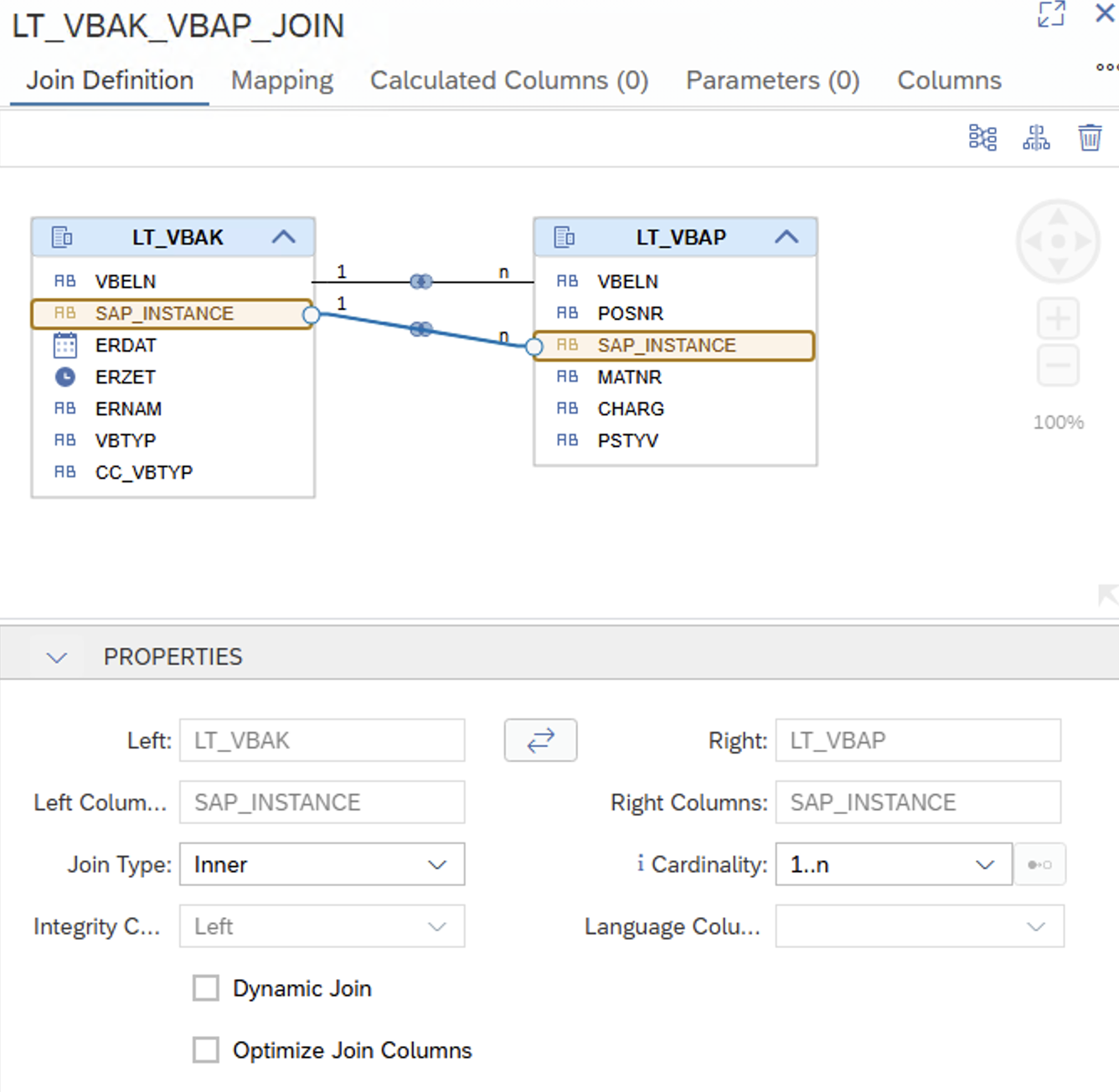
3.1 Maintain Correct Cardinality
Cardinality plays a very important role in SAP HANA optimization.
Best Practice
Always maintain the correct cardinality while joining nodes.
Why?
Proper cardinality helps:
- SAP HANA optimizer
- Reduce duplicate generation
- Improve execution plans
- Optimize aggregation
Example
Use:
- 1..1
- 1..N
- N..1
- N:M
based on actual business data.
Wrong cardinality may lead to duplicate records and incorrect measures.
4. Use SQL Engine Instead of Column Engine in Calculated Columns
While creating Calculated Columns, many developers directly use Column Engine formulas.
Best Practice
Whenever possible, use SQL Engine calculations instead of Column Engine.
Why?
- Better performance
- Faster execution
- Easier formula handling
- Better optimization
Especially for complex formulas, SQL Engine performs much better compared to Column Engine calculations.

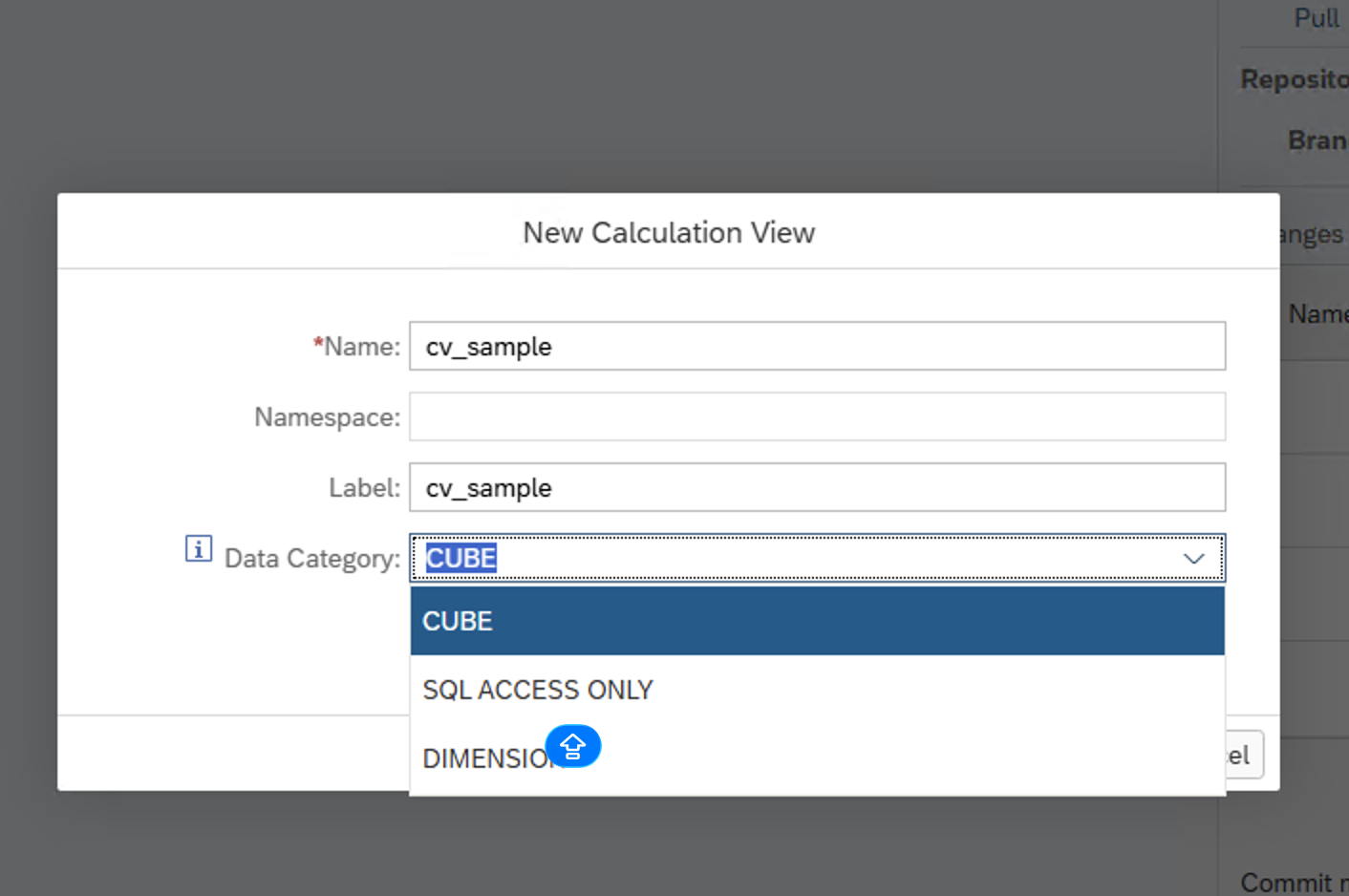
5. Choose the Proper Calculation View Type Initially
SAP HANA provides different Calculation View types:
- Dimension
- Cube
- Cube with Star Join
Best Practice
Select the correct Calculation View type during the design phase itself.
Why?
Changing the view type later may require redesigning the entire model.
Recommendation
- Use Dimension Views for master data
- Use Cube Views for transactional reporting
- Use Star Join for analytical scenarios
Proper architecture at the beginning saves a lot of development effort late
6. Validate Wrapper Calculation Views Properly
In many projects, Wrapper Calculation Views are used to combine or expose existing views.
Best Practice
Whenever using Wrapper Views:
- Validate mapping properly
- Check field consistency
- Ensure measures and attributes are mapped correctly
Why?
Incorrect mapping may:
- Break reporting
- Produce wrong outputs
- Cause aggregation issues
7. Prefer Input Parameters Instead of Variables
This is one of the important performance optimization techniques.
Best Practice
Whenever possible, use Input Parameters instead of Variables.
Why?
Input Parameters:
- Push filters early
- Execute faster
- Reduce data load
Variables generally apply filters after data retrieval, whereas Input Parameters apply them before execution.
This creates significant performance improvement for large datasets.
7.1 Avoid Hard Filters – Use Input Parameters
Best Practice
Instead of directly applying filters inside nodes, try converting them into Input Parameters.
Benefits
- Dynamic filtering
- Reusable Calculation Views
- Better flexibility
- Improved performance
This also helps reporting tools pass dynamic values during execution.

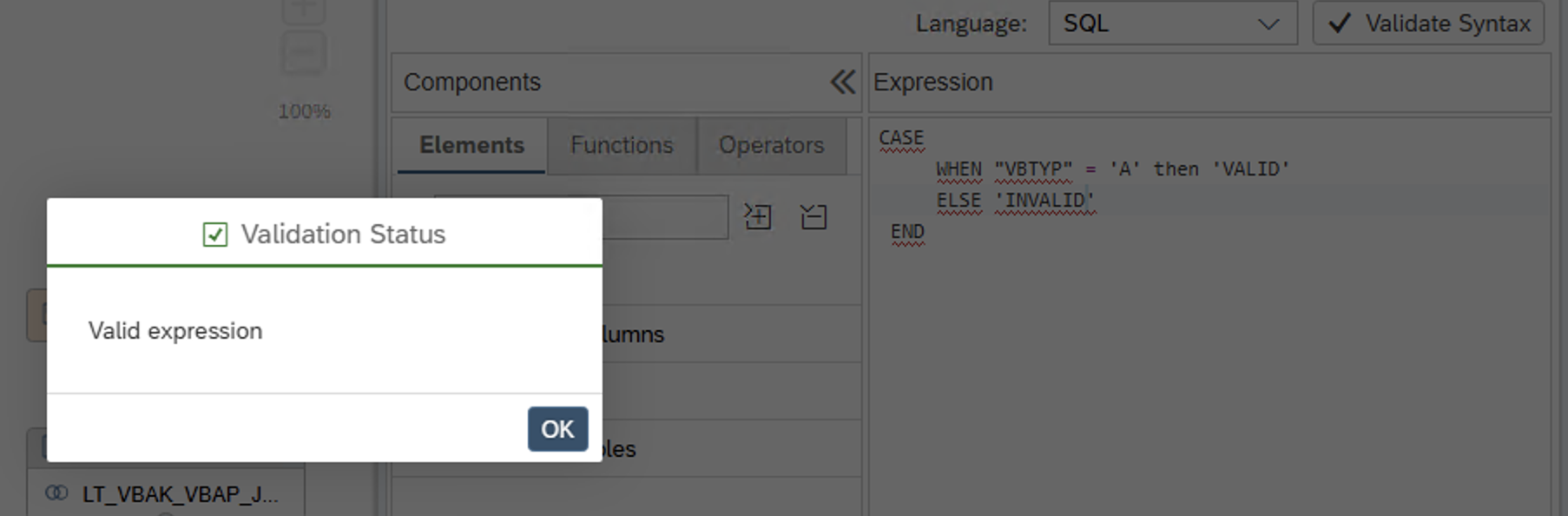
8. Validate Calculated Column Formulas Properly
A small mistake in formulas may lead to:
- Wrong calculations
- Null outputs
- Aggregation issues
Best Practice
Always validate:
- Formula syntax
- Data type handling
- Null conditions
- Decimal calculations
Before transporting to production, thoroughly test all calculated fields.
9. Use Table Functions or Procedures for Complex Logic
Sometimes developers try to implement all business logic inside graphical views.
Best Practice
For very complex logic:
- Use Table Functions
- Use SQLScript Procedures
Suitable Scenarios
- Complex joins
- Dynamic SQL
- Advanced calculations
- Large conditional logic
This keeps graphical views simpler and easier to maintain.
11. Push Down Filters
Filter pushdown is one of the key optimization techniques in SAP HANA.
Best Practice
Apply filters as early as possible in the lower nodes.
Why?
- Reduces intermediate data
- Improves execution time
- Reduces memory usage
The less data flowing to higher nodes, the faster the execution.

11. Use Proper Aggregation Functions
Improper aggregation creates incorrect reporting results.
Best Practice
Always validate aggregation settings for measures.
Examples
| Field Type | AggregatiOn |
|---|---|
| Sales Amount | SUM |
| Quantity | SUM |
| Percentage | AVG |
| Dates | MAX/MIN |
Incorrect aggregation is one of the major causes of reporting mismatches.
12. Follow Proper Naming Conventions
Naming conventions improve maintainability and debugging.
Best Practice
Use meaningful names for:
- Calculation Views
- Projection Nodes
- Join Nodes
- Aggregation Nodes
- Calculated Columns
Example
- CV_SALES_REPORT
- PRJ_CUSTOMER
- JN_SALES_HEADER_ITEM
Benefits
- Easier debugging
- Better understanding
- Easier support activities
Real-Time Project Learnings and Useful Tricks
These are some practical observations from real project experience.
1. Sometimes Build Completes but Changes Are Not Reflected
There are situations where:
- Build completes successfully
- But changes are not reflected properly
Solution
Try:
- Saving from Code Editor
- Then rebuilding the Calculation View
In many cases, this refreshes metadata properly.
2. Input Parameter Name Issues in Graphical View
Sometimes SAP HANA graphical modeling does not allow certain column names matching Input Parameters.
Workaround
Try updating the changes directly in the Code Editor level.
This helps resolve naming conflicts in some scenarios.
3. Column Addition or Deletion Can Be Done in Code Editor
Many developers recreate nodes for small modifications.
Best Practice
You can directly:
- Add columns
- Delete columns
- Adjust mappings
through the Code Editor itself.
This saves a lot of development time.
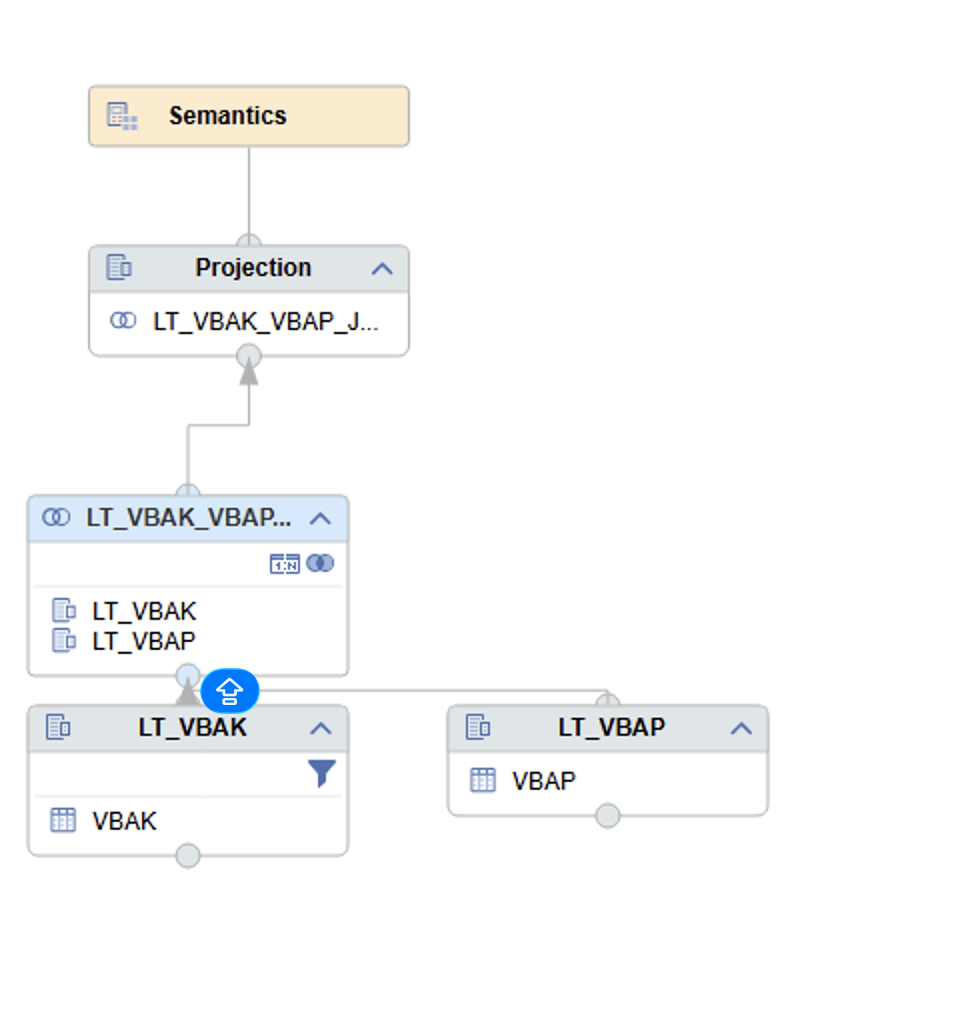
4. Drag-and-Drop Technique for New Nodes
Many developers recreate entire nodes manually.
Easier Approach
If you want to insert a new node in between:
- Simply drag and drop the node
- SAP HANA automatically maps the fields
Benefit
- Faster development
- Easier mapping
- Reduced manual effort
Conclusion
Developing efficient SAP HANA Calculation Views is not only about creating models that work — it is about creating models that are:
- Performance
- Scalable
- Maintainable
- Easy to troubleshoot
Small optimizations such as:
- Selecting only required columns
- Maintaining proper cardinality
- Using Input Parameters
- Pushing down filters
can create huge performance improvements in production systems.
Most importantly, real-time project experience teaches us that understanding SAP HANA behavior internally is equally important as knowing the modeling techniques.
A well-designed Calculation View today can save countless performance issues tomorrow.