Two zero-copy paths to bring your SAP data together with the analytics and AI platform you already run. Here is how each integration works, and how to choose.
SAP Business Data Cloud brings SAP Datasphere, SAP Analytics Cloud, and SAP Databricks into one governed environment for SAP and non-SAP data. For most enterprises the question is not whether to adopt it, it is how to connect it to the data platform their teams already use. Two partnerships matter most here: Snowflake and Databricks.
Both integrations share a theme. Data moves by zero-copy sharing over the open Delta Sharing protocol, not by copying or building pipelines. SAP data stays governed and current. What differs is how each platform plugs in, and what you get.
We wrote this for the people weighing these options and those looking to simply understand the choices, from technology executives, to architects and developers, and to the business leaders who own the outcomes. Below, we lay out both integrations with a decision tree for each.
Snowflake and SAP Business Data Cloud
Zero-copy, bidirectional data products. No pipelines.
SAP and Snowflake now share data directly. SAP data products move both ways over the open Delta Sharing protocol, staying current and governed on both sides. Data and AI teams get real-time access to semantically rich SAP data without ETL or duplication.
The two building blocks
- SAP Snowflake (Solution Extension). Snowflake delivered, billed, and supported by SAP, with the full power of native Snowflake. Provisioned in SAP for Me. SAP automates the connection to BDC.
- BDC Connect for Snowflake. A bridge to a Snowflake you already own. Secure, bidirectional, zero-copy sharing of data products with near real-time metadata updates.
Which option fits
Three options follow from two questions: whether you already run Snowflake, and whether you want an SAP-managed Snowflake for new work.
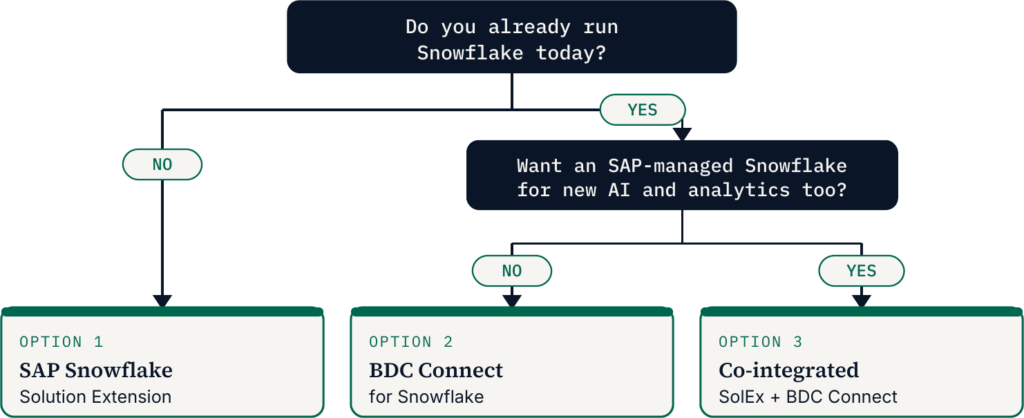
SAP Snowflake (Option 1). Choose it when you have no Snowflake today and want a Snowflake environment that SAP manages end to end. You get one vendor for procurement and support, and zero-copy access to SAP data products with no transfer fees.
BDC Connect (Option 2). Choose it when you already run Snowflake and want governed SAP data in your Snowflake environment without copying. You get real-time SAP data products inside your existing estate, and your Snowflake contract stays as is.
Co-integrated (Option 3). Choose it when you want SAP-managed Snowflake for new work and keep your existing Snowflake for historical processes. You get one data-product workflow across both. Blend SAP and native Snowflake data, then share derived products back to BDC.
What is common to all three
- Sharing. Zero-copy and bidirectional via Delta Sharing. SAP stays the source of truth.
- Governance. Discoverable in the SAP BDC Catalog and Snowflake Horizon.
- AI. Snowflake Cortex AI on SAP data. Pair with SAP Joule for agents.
A note on cost. BDC is priced by consumption using Capacity Units. With SAP Snowflake Solution Extension, your Snowflake runs through your SAP agreement, and sharing data products between BDC and SAP Snowflake carries no separate data-sharing fees. BDC Connect is different as this requires a BDC subscription, and nominal Capacity Unit charges apply for data transfer, such as API calls and cross-region movement, on top of your existing Snowflake contract. So if you already run Snowflake, plan for BDC Connect to add to your total cost of ownership, not replace it. Mindset can assist in confirming current pricing with SAP.
Databricks and SAP Business Data Cloud
Zero-copy data science on governed SAP data. No ETL.
SAP partnered with Databricks and delivers it through SAP Databricks, an embedded OEM component inside BDC. Data products move over the open Delta Sharing protocol, so AI and machine learning run on governed SAP data without copying or pipelines, across both structured and unstructured data. A lighter path federates Databricks Delta Lake live into SAP Datasphere over Java Database Connectivity (JDBC).
The two building blocks
- SAP Databricks (embedded). A special edition of Databricks embedded in BDC as an OEM component. Serverless and compute-focused, provisioned inside your BDC formation. Runs Delta Lake, Unity Catalog, notebooks, Spark, and MLflow on SAP data, with storage governed in BDC.
- BDC Connect for Databricks. A bridge to a Databricks you already own. A one-time setup of the BDC Connect service enables zero-copy, bidirectional Delta Sharing of data products, discoverable in Unity Catalog.
Which option fits
As we saw with Snowflake, there are two aspects to consider: whether you already run enterprise Databricks, and whether you also want embedded SAP Databricks for SAP-centric AI.
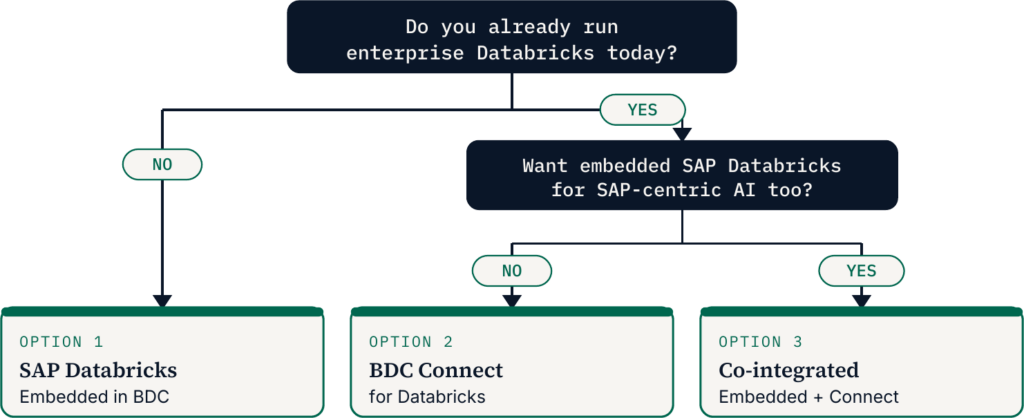
SAP Databricks (Option 1). Choose it when you have no Databricks today and want AI and ML on SAP data inside BDC. You get a serverless Databricks embedded in BDC, with single-click zero-copy access to SAP data products and no ETL.
BDC Connect (Option 2). Choose it when you already run enterprise Databricks and want governed SAP data in your Databricks environment without copying. You get bidirectional Delta Sharing. SAP data products appear in your Unity Catalog, and your Databricks data flows back to the BDC catalog via the BDC Python SDK.
Co-integrated (Option 3). Choose it when you want embedded SAP Databricks for SAP-centric AI and keep your enterprise Databricks. You get SAP data science inside BDC plus your existing lakehouse. Build data products in either and share them across both catalogs.
What is common to all three
- Sharing. Zero-copy over Delta Sharing. Single-click from the BDC catalog, no ETL.
- Governance. Unity Catalog governs data, models, and notebooks. SAP data products stay governed.
- AI and ML. Full lifecycle with Spark, notebooks, and MLflow on curated SAP data.
A note on cost. Similar to what we saw above with Snowflake, the same consumption model applies for Databricks.. SAP Databricks is a first-party part of BDC, paid for with the same Capacity Units, so the embedded option folds into your BDC spend. BDC Connect for Databricks follows the Snowflake pattern. It needs a BDC subscription, adds nominal Capacity Unit charges for data transfer, and sits on top of your existing Databricks contract. Weigh the embedded option against connecting what you already run, and Mindset can assist in confirming current pricing with SAP.
How to choose
The pattern repeats across both platforms. If you do not run the platform yet, the SAP-delivered edition gets you started fast under one vendor. If you already run it, BDC Connect brings governed SAP data to your existing estate without copies. If you want both, the co-integrated path keeps one data-product workflow across environments. None of the options is a default. The right one follows from what you already run and who manages it.
Snowflake and Databricks are not mutually exclusive either. BDC is the common layer. It can share the same governed SAP data products to both, which means the platform choice does not lock away your SAP data.
Mindset builds on SAP Business Data Cloud every day. If you are weighing these paths, we can help you scope the right one.
Intelligence, Experienced