
Understanding SAP Business Data Cloud (BDC) architecture is critical for enterprises planning their data strategy. This technical analysis explores what “zero copy” really means in SAP BDC, how Delta Share integration works, and where data duplication still occurs between Datasphere and Databricks.
Demystifying Zero Copy and Delta Share in SAP BDC
I’m taking a page from Richard Hirsch‘s playbook to reverse engineer what SAP means by “Zero Copy” in the context of SAP Business Data Cloud (BDC) data product usage, especially regarding Delta Share. At Mindset Consulting, we’ve noticed SAP’s terminology around SAP BDC zero copy and Delta Share can be unclear and sometimes contradictory.
Unlike Richard’s documentation-based approach, I tackle these questions theoretically, synthesizing information from multiple sources. This analysis represents my interpretation after digesting SAP’s documentation, marketing materials, and public statements over the past week. Let’s start with foundational definitions.
What is Zero Copy Architecture?
Zero Copy means data can be operated on without copying it. However, there’s no such thing as pure “zero copy” in computing. When you display data from your local disk on screen, it’s copied from disk to RAM, then to CPU registers, then to your screen. In a client-server scenario—like an SQL query retrieving the top 10 customers from a sales database—the server processes data (involving local copying), then sends the result set to the client. That word “sends” is another way of saying “copy.”
When technologists say “zero copy,” they actually mean “minimal copying”—achieving tasks with the least amount of data movement possible. We typically prioritize local copying over network copying because local operations are usually faster, though we often overlook their occurrence (which can be risky).
Understanding Delta Share in SAP BDC Context
Delta Share is a data sharing framework built by Databricks on top of the Delta Lake storage framework. Delta Lake consists of directories of Parquet files plus metadata on cloud object storage. Delta Share provides an API for secure (with caveats) and performant (with limitations) remote sharing of Delta Lake tables. But how does this sharing work? By facilitating high-bandwidth copying of the entire Delta Lake table to the requesting client, which then stores and processes that data locally.
In our earlier example, if a client using Delta Share wants the top 10 customers from a sales table, the entire table is copied to the client (often multiple GBs or TBs). The client then stores that data and performs whatever processing is needed to generate the 10-record answer. Since the client now has a complete copy, they can grant access to others or perform additional calculations. While Delta Share offers mechanisms for column-level access control, partition-level restrictions, and delta (change capture) updates to avoid re-transferring entire tables, these qualifications explain the “sort of” caveats regarding security and performance. SAP has confirmed that SAP BDC will support Delta Share.
SAP BDC Architecture: The Good News and Bad News
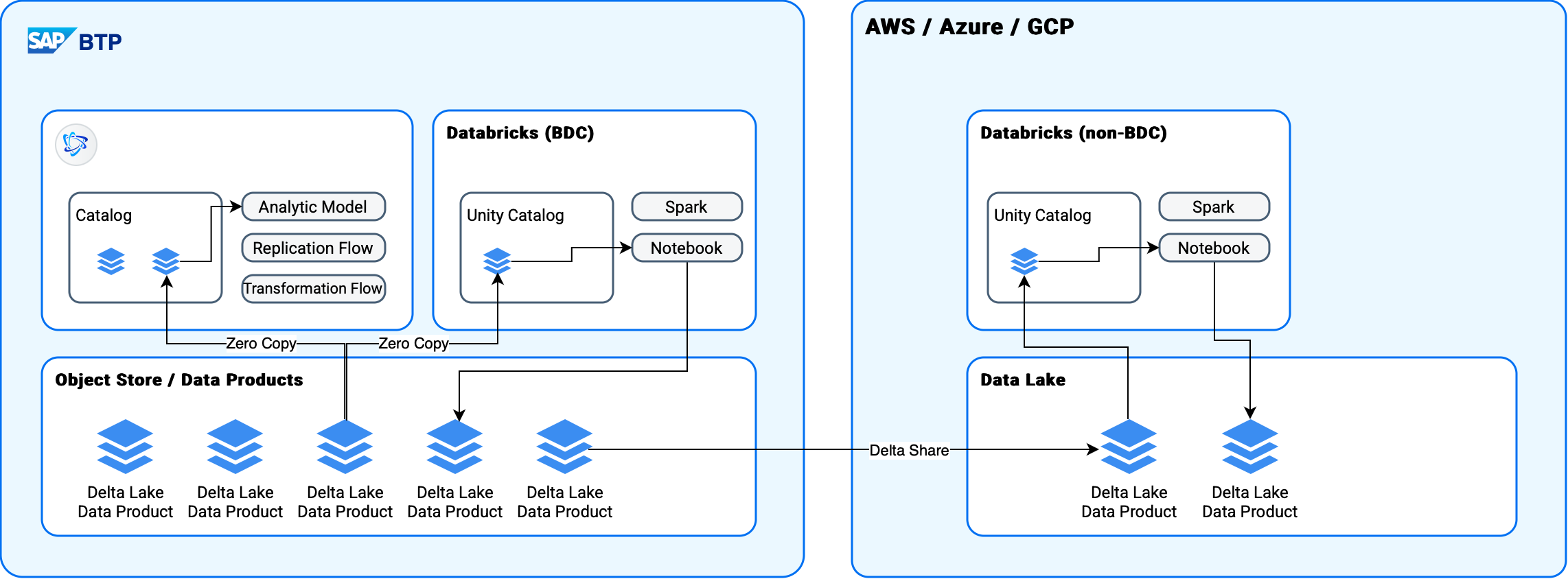
Now that we’ve established our definitions, what does this mean for SAP’s Business Data Cloud architecture? SAP BDC includes a Databricks version hosted by SAP. Recent discussions have focused on performance and data duplication when using Databricks on BDC data managed by Datasphere (SAP’s data warehouse/lake/catalog product). Questions also arise about non-BDC Databricks installations where Delta Share promises to solve these challenges. Here’s the reality:
BDC-Hosted Databricks: Minimal Data Duplication
For the BDC Databricks, I expect to see genuine “zero” (meaning “minimal”) copy functionality based on Delta Lake data products in a shared repository. In other words, Datasphere and Databricks will likely access the same files in the same repository—true SAP BDC zero copy architecture.
However, if either Databricks or Datasphere creates a derivative, materialized data product, duplication will occur. Datasphere’s default data product creation mode is view-based (not materialized), which avoids copying. But if a transformation flow is used, copying happens. Databricks defaults to materialized data product creation, so we’ll still see significant copying. The good news: these new copies should be available to Datasphere without additional copying.
Non-BDC Databricks: Delta Share Means Copying
For non-BDC Databricks installations, Delta Share will facilitate access to data persisted in BDC. This is a copy of the original data product. Additionally, derivative data products created in Databricks won’t be available to BDC by default. They would need to be reimported (copied) into BDC using a replication flow, or potentially via Delta Share if SAP supports using BDC as a Delta Share client.
Critical Unanswered Questions About SAP BDC
Several unknowns remain because SAP hasn’t shared technical details about how BDC Databricks will access data or specifics about view-based data product access. I’m assuming Datasphere’s data product access will use the same mechanism as the Object Store processing framework. Here are the primary questions I haven’t seen answered:
- Will BDC Databricks truly use zero-copy data access? Or will it function as a Delta Share client under the hood, copying BDC data products to its own Data Lake? I expect a zero-copy approach, but certainty is elusive.
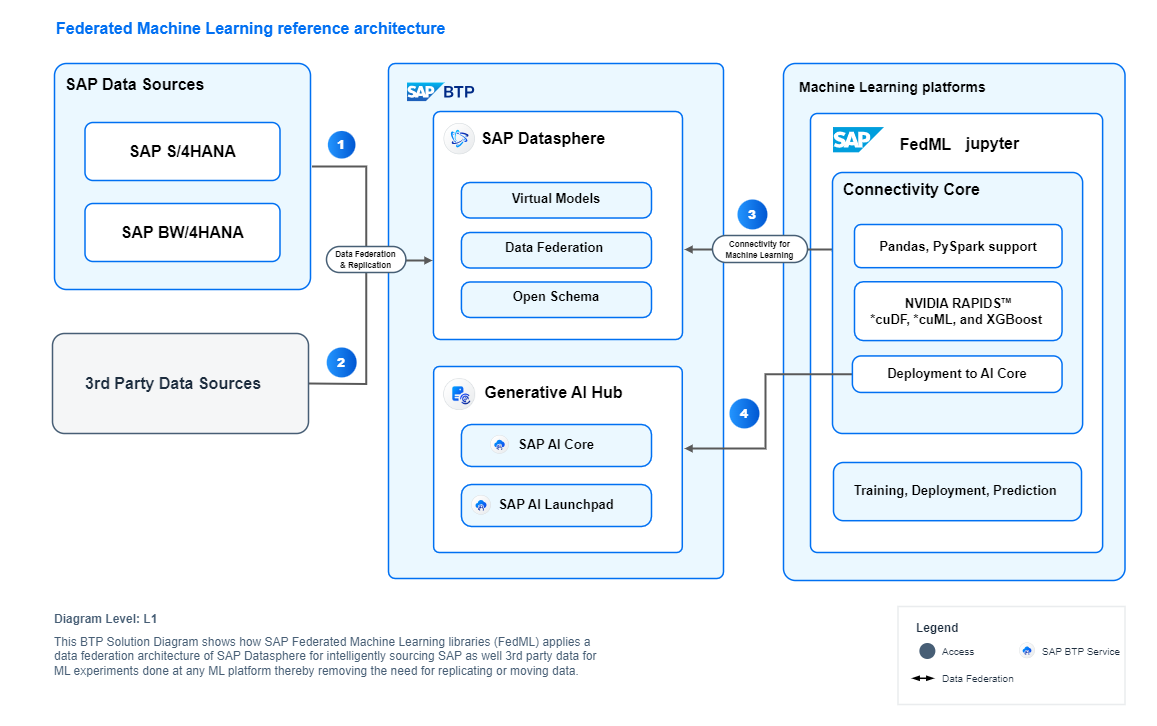
- Can BDC Databricks access view-based data products? Will it access and operate on view-based data products created in Datasphere, or only materialized data products in the object store (SAP’s foundation layer)? I suspect the latter initially, though I expect SAP will eventually offer something similar to FedML (Federated Machine Learning), which allows using view-based data products in notebooks and Spark processes.
- Is data product metadata replication automatic? Does replication between the Datasphere Catalog and Unity Catalog happen automatically, or must we configure it per data product?
- What’s the transactional/locking strategy? When a data product updates, what happens with write-contention and read/write-contention? Will Delta Share updates be supported?
What’s Next for SAP Business Data Cloud
These are the questions I’ll be monitoring over the next few months as SAP Business Data Cloud moves through initial rollout to general availability and beyond. Understanding SAP BDC architecture is crucial for enterprises planning their data strategy, especially those considering how SAP BTP manages data and analytics at enterprise scale.
Expert SAP BDC Consulting from Mindset
If your company is working to understand SAP BTP, BDC, Datasphere, SAP Analytics Cloud, BW and how they fit into your future enterprise roadmap or integrate with non-SAP analytics infrastructure, this is exactly what we do at Mindset Consulting. We specialize in SAP Business Technology Platform services and can help you navigate the complexities of SAP Business Data Cloud architecture.
Our team of SAP experts can help you:
- Design optimal data architectures leveraging SAP BDC and Datasphere
- Minimize data duplication and maximize performance in your SAP data ecosystem
- Integrate Databricks with your SAP landscape efficiently
- Plan migration strategies from legacy SAP BW to modern cloud solutions
- Implement best practices for SAP BTP data management
Ready to optimize your SAP data strategy? Contact Mindset Consulting to discuss how we can help you leverage SAP Business Data Cloud effectively.
Have questions about SAP Business Data Cloud architecture or need help with your data strategy? Connect with us on LinkedIn or visit our SAP BTP practice page to learn more.
