
In this blog, I will discuss the Shallow and Deep Copy of JavaScript arrays and objects.
Shallow Copy:
A shallow copy refers to specific values that are still connected to the original Variable (Array or Object). Every change to a new variable will affect the original variable.
Deep Copy:
A deep copy means that all the values of the new variable are copied to a new variable and disconnected from the original variable. All changes to a new variable will not affect the original variable.
Let us understand each with examples.

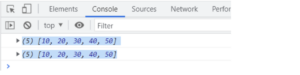
Note: The variables ‘marks’ and ‘marks2’ will have the same output.
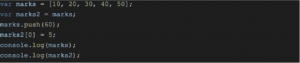

The variables ‘marks’ and ‘marks2’ will have the same output because both variables point to the same reference/memory. Therefore, the example above, example array elements 60 and 5, is reflected in both variables.
So far, I have shown how copying arrays and modifying them reflects changes in both variables. A shallow copy can be done in the following ways:
Using the .concat Method
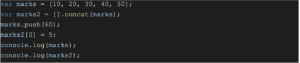
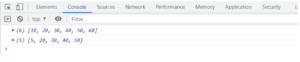
Here the output is different in each variable. We took an empty array and then concatenated it with the original array. So modifying either of them is not affecting the other.
Using Array.from Method
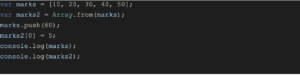

The Array.from() static method creates a new, shallow-copied Array instance from an iterable or array-like object.
Using the Slice Method
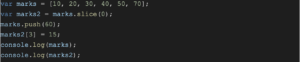

The Slice method gives a new array, so the output for each array is different and not affected by each other.
Using Spread operator (…)


The spread operator method also creates a new array, so the output differs in each array, and any modification can affect either.
Up until now, we have seen how shallow copy works in the case of arrays. Now we will see the same in the case of objects.

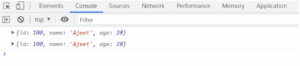
Copying one object into another gives the same output.

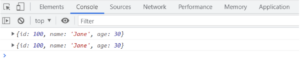
Copying one object into another and modifying either will affect each of them; hence, the output will be the same.
Now we will see how to do Shallow Copy in case of an object.
Using the Assign Method
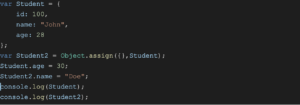
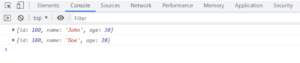
The assign method creates a new object. It takes two arguments. One is an empty object {}, and the second is some object. Hence the output is different in both variables, which does not affect one or the other on modifying either.
Using Spread operator


The spread operator(…) creates a new object. Hence the output is different in both variables, which does not affect each other by modifying either.
Let’s look at how Deep Copy works in Arrays and Objects.
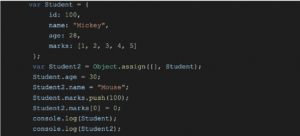
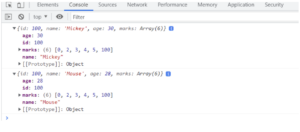
Here, you can see that changing the object’s property in each object does not affect the other, but changing the array’s value inside the object affects the array in both objects.
We added 100 in the last position of the 1st object’s array, which also added 100 in the last position of the 2nd object’s array. Similarly, We added 0 in the first position of the 2nd object’s array, which also added 0 in the first position of the 1st object’s array.

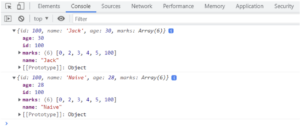
With the spread operator, it behaves in the same way as shown above.
So, here, the shallow copy doesn’t seem to work. This is where we bring in the concept of a deep copy.
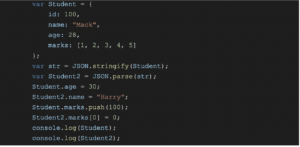
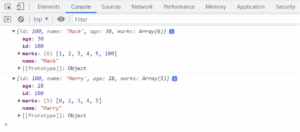
Converting the array into a string, then converting it back to an object and storing it into another variable disconnects both objects. Hence, modifying the object’s property and array’s element inside each object will give a different output for each object.
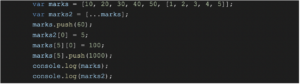
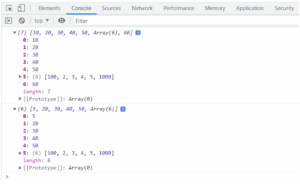
Similarly, in the case of arrays, the shallow copy fails if there is a nested array.
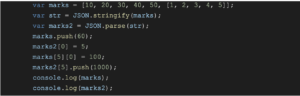
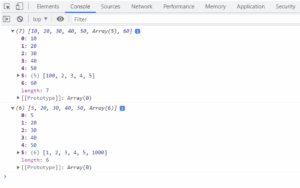
Converting the array to a string and then back to the object also creates a Deep copy in the array.
So, we learned what are Shallow and Deep copies of arrays and objects are. How to create Shallow create the Shallow and Deep copy of arrays and objects. Different ways of creating Shallow copies of objects and arrays and flaws with Shallow copy.
These are the topics in JavaScript that many developers overlook as a result of code breaks in the future, leading to the app crash. I hope these concepts help you in your development journey in JavaScript.
Happy Coding!!
If you’re interested in viewing similar content, you can visit our blog library here.
View our LinkedIn here.