
What is SAP Fiori? Understanding SAP’s Design System in 2025
Originally published 2022 | Updated October 2025
Anyone working in the SAP space knows that SAP changes product names often—sometimes too often. It creates confusion and frustration, especially when trying to define what a product really is, what it does, or what it represents.
Over the years, SAP Fiori has been one of the most misunderstood SAP concepts. When Fiori first launched, I looked up the word’s meaning. It’s the plural of fiore, the Italian word for flower. Unlike some products, this association didn’t help clarify what it was—it appeared to be another abstract name created by marketing teams.
Since then, I’ve heard Fiori described as a user interface, an application type, a launchpad, a portal, a development framework, and a design standard.
So which one is it? Maybe none of those things—or all of them?
It’s similar to Apple TV. When people say “I have Apple TV” or “I watch Apple TV,” do they mean Apple TV+ (the streaming service), the Apple TV app, or the Apple TV device? Even design-driven organizations like Apple can confuse consumers with unclear product naming.

Apple TV in its various forms, courtesy of Apple.com
Similarly, when someone tells me “We use Fiori,” can I know what they mean? The short answer: no.
The longer answer: I can guess they run some combination of Fiori Launchpad (FLP) with out-of-the-box Fiori apps from SAP, custom-developed UI5/Fiori apps, and standard SAP GUI transactions launched in a web browser. But I have to ask questions to get a clear picture.
What Fiori Really Is: A Design System
Let’s bring clarity to this confusion. First and foremost, SAP Fiori is a design system. It’s not entirely clear whether SAP originally intended it to be one. The concept of a design system only gained popularity in the past 5-7 years within design and development communities. Previously, pattern libraries, style guides, and component libraries were more common.
I realized Fiori was a design system just two years ago during a UX seminar. At that time, SAP didn’t use the term “design system” on their public sites, but they’ve since adopted and promoted it on their Design Guidelines page.
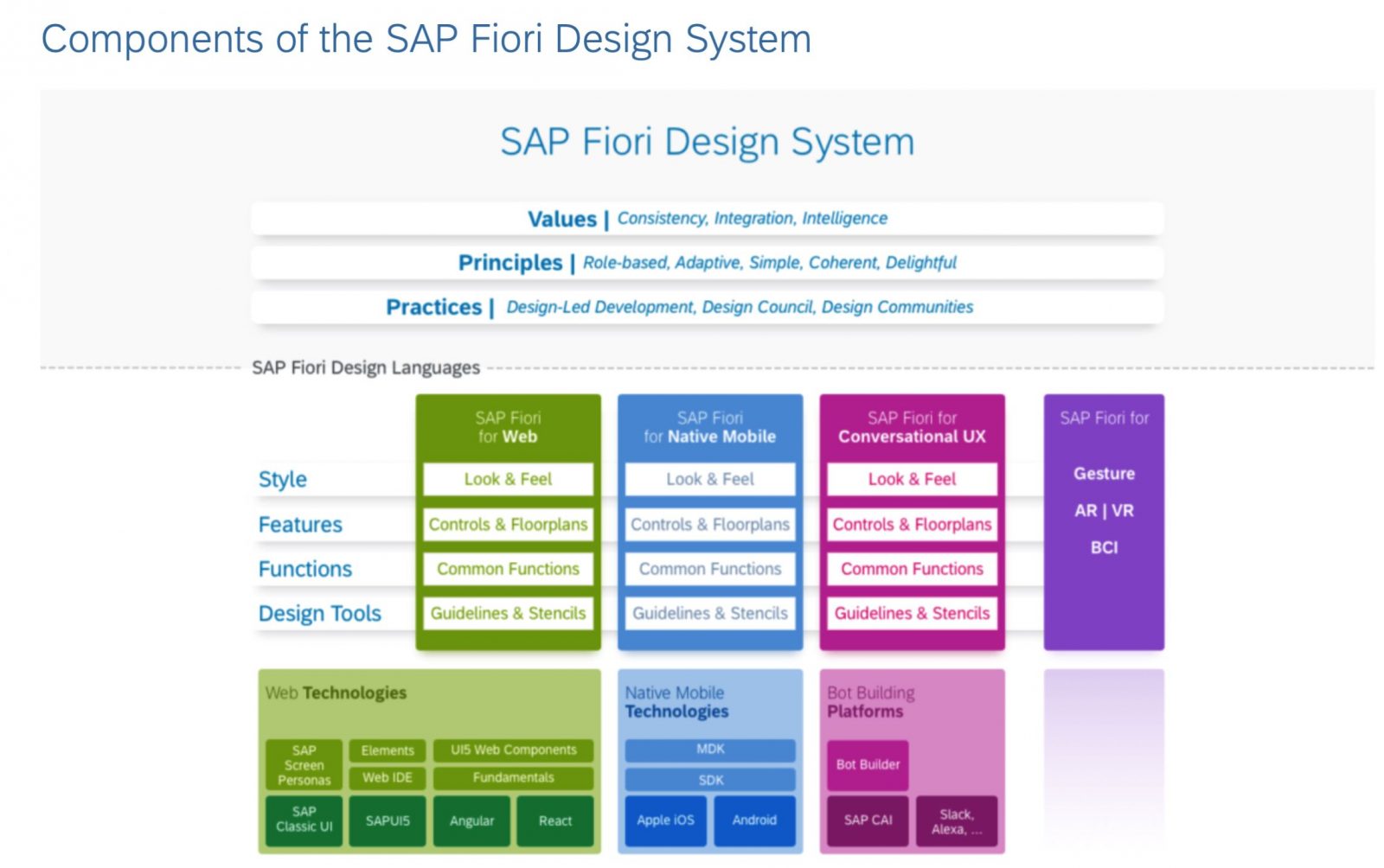
Components of the SAP Fiori Design System
What is a Design System?
In simple terms, a design system is a collection of design values, principles, guidelines, and design language that drives a consistent user experience across all applications from a company.
You’re influenced by several design systems daily, whether you know it or not:
- Google’s Material Design
- Apple’s Human Interface Guidelines (HIG)
- Microsoft’s Fluent Design System
These systems drive your daily mobile device, personal computer, and work experiences. Reviewing them helps crystallize what a design system means.
Interestingly, SAP attempts to comply with Material Design and HIG for their SAP Fiori Android and iOS design guidelines. It’s a complex network of design in today’s UX world.
What Fiori is NOT
After understanding what Fiori is, it’s important to clarify what it’s not.
Fiori is not a “technology.” It’s not a technology platform, tech stack, or development framework. While people commonly say they “develop Fiori applications,” the classification of a Fiori application is based on compliance with the Fiori Design System—not the technology used to build it.
The Fiori Design System encompasses technologies across SAP and non-SAP platforms, including web, mobile, and conversational interfaces. This technology portfolio has evolved over the years and will continue to grow as SAP and the development community advance.
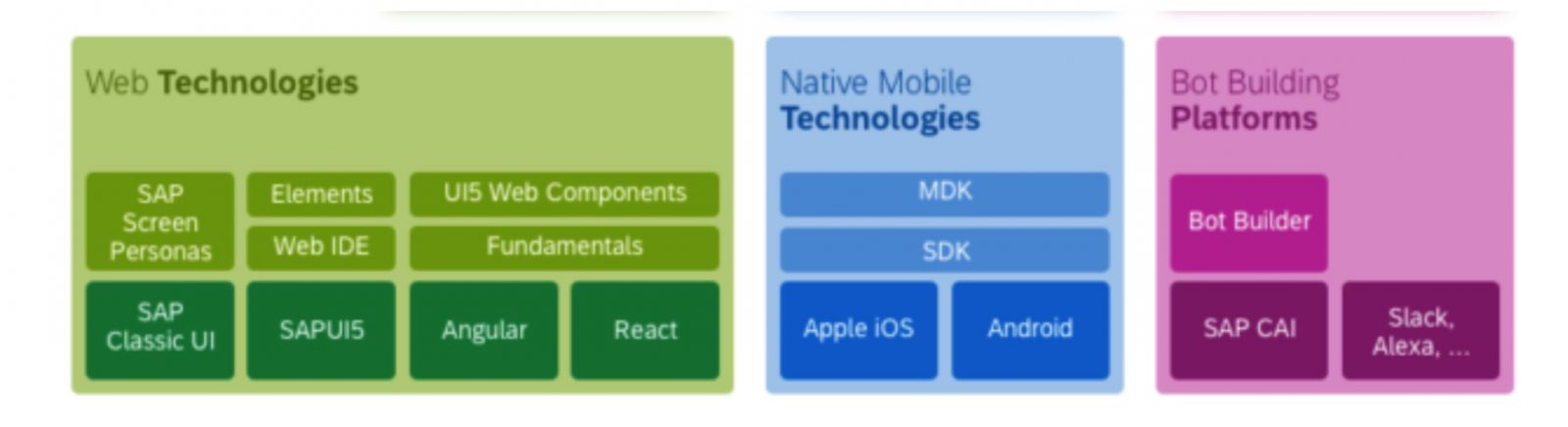
Technologies used to develop Fiori applications
How SAP Build is Transforming Fiori Development
2025 Update: The Fiori development landscape has dramatically evolved with the introduction of SAP Build. This suite of low-code and pro-code tools is revolutionizing how organizations create Fiori-compliant applications.
SAP Build: Accelerating Fiori App Development
SAP Build represents a paradigm shift in Fiori application development. It combines multiple capabilities into one unified platform:
- SAP Build Apps – Create pixel-perfect, Fiori-compliant applications with drag-and-drop simplicity
- SAP Build Process Automation – Automate workflows and business processes with visual tools
- SAP Build Work Zone – The modern evolution of Fiori Launchpad, providing a unified digital workplace
- SAP Fiori Elements – Generate complete applications from metadata with minimal coding
What makes SAP Build transformative is its ability to maintain perfect Fiori design compliance while dramatically reducing development time. Organizations can now build production-ready Fiori applications in days rather than months.
The Power of Fiori Elements and Building Blocks
SAP Fiori elements has matured into a powerful framework that generates applications at runtime from OData services. Using annotations and building blocks—reusable components like tables, forms, filter bars, and charts—developers can create enterprise-grade applications with:
- Built-in personalization and variant management
- Export and import functionality
- Responsive behavior across devices
- Full accessibility compliance
- Extension points for customization
These features, which would take months to develop from scratch, come built-in through simple annotations. This is the ultimate developer productivity solution while maintaining the highest UX standards.
Learn more about how Mindset helps organizations leverage SAP Business Technology Platform (BTP) for Fiori development and extension.
Gray Areas and Common Misperceptions
Like most things, there’s gray area with Fiori. This includes how we label applications as “Fiori applications.”
As stated earlier, a Fiori application is classified by conformance to the Fiori Design System—not the technology used to develop it. However, the degree of conformance varies significantly.
Visual Themes vs. True Fiori Apps
SAP has done a commendable job applying visual themes to classic SAP GUI and Webdynpro applications. This harmonizes the look and feel of applications launched in web browsers, helping users feel less like they’re switching between different software platforms.
However, keen observers notice differences in screen layout, formatting, and individual components (dropdowns, grids, etc.). Additionally, visually themed GUI applications aren’t as responsive as SAPUI5 counterparts. They’re not fully supported across all device resolutions and definitely not portable to native mobile apps.
For this reason, a “true Fiori application” typically refers to one developed with:
- SAPUI5 (or another HTML/JavaScript framework) for web browsers
- Native mobile technologies for mobile devices
These applications are fully compliant with the design system and meet modern application expectations: responsiveness, device compatibility, and superior user experience.
Common Misperception #1: “We Run Fiori”
Organizations often classify Fiori Launchpad (FLP) as a standalone application or use it to justify whether they “use Fiori.” In reality, FLP is a type of Fiori application that complies with design guidelines and serves as a user homepage.
2025 Update: SAP Build Work Zone is now positioned as the evolution of Fiori Launchpad for SAP BTP environments, offering enhanced personalization, collaboration features, and unified access to SAP and third-party applications.
Common Misperception #2: “We Run All Fiori”
When organizations say “We run all Fiori,” it typically means their main access point to SAP is via Fiori Launchpad (or Build Work Zone), from which users launch a mixture of classic GUI, Webdynpro, and Fiori applications.
It rarely means they run only true Fiori applications. Always clarify the percentage mixture of application types when describing your SAP UX strategy.
The Future of Fiori: AI-Powered and Human-Centered
As we move through 2025, Fiori continues to evolve with embedded AI capabilities, including integration with SAP’s Joule copilot and generative AI tools. The design system now supports:
- AI-assisted development in SAP Business Application Studio
- Intelligent automation through SAP Build Process Automation
- Natural language interactions with Joule
- Context-aware recommendations and insights
At Mindset, we combine SAP’s technical capabilities with our human-centered design approach. Our AppHaus methodology ensures that Fiori applications aren’t just technically compliant—they’re intuitively designed for the people who use them daily.
Explore our SAP User Experience services to see how we help organizations design, develop, and deploy Fiori applications that users love.
Conclusion: Defining Fiori for Better Conversations
Understanding that SAP Fiori is a design system—not a single technology, application, or portal—helps eliminate confusion and enables more productive conversations about SAP UX strategy.
Key takeaways:
- Fiori is a comprehensive design system with values, principles, and guidelines
- True Fiori applications are classified by design compliance, not technology
- SAP Build has transformed Fiori development, making it faster and more accessible
- Build Work Zone is the modern evolution of Fiori Launchpad
- Organizations typically run a mixture of application types, not “pure” Fiori
Whether you’re beginning your Fiori journey or optimizing an existing implementation, clarity on these definitions will help your team make better strategic decisions.
Need help defining or executing your SAP Fiori strategy? Contact Mindset to discuss how our expertise in SAP BTP, SAP Build, and human-centered design can accelerate your UX transformation.
Interested in more SAP insights? Visit our blog for additional articles on SAP technology and user experience.
Connect with us on LinkedIn for the latest updates.
