
After starting out my career as an SAP Portal Developer, I will always have fond memories of the platform. However, after over a decade of experience in the SAP world consulting for dozens of Fortune 500 companies, I have finally come to realize most organizations don’t really use the Portal for what it was intended. Most use it simply to provide Single Sign-On (SSO) to SAPGUI for Windows.
In this blog I’m sharing a new SAP Fiori app we wrote (very beta) that can launch all of your SAPGUI Windows t-codes with SSO to any backend system, right from your Fiori Launchpad.
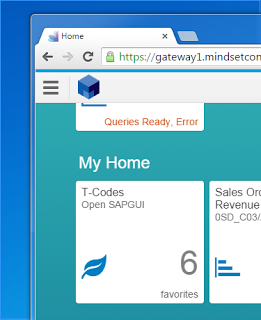
See the new tile on your launchpad that shows your t-code count available. Click that and it launches the app.
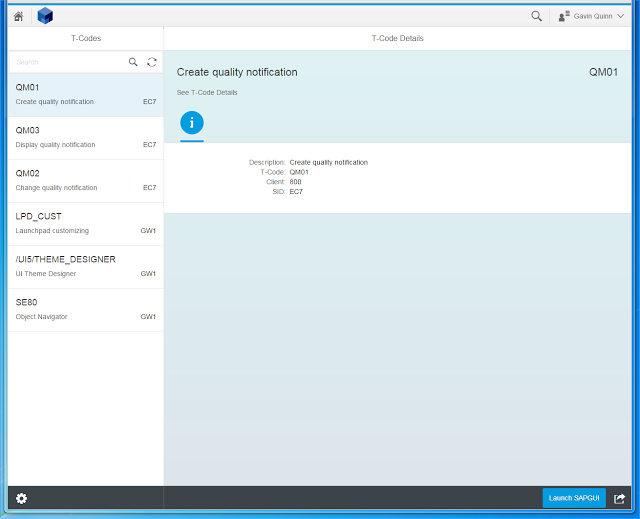
Notice on the left, you can search all t-codes (we default it to favorites, but it can be extended of course). Also, we use multi-origin Gateway service to grab t-codes from all back-end systems, not just a single one.
On the bottom, notice the Launch SAPGUI button. Click that.

Click the link that shows up at the bottom.
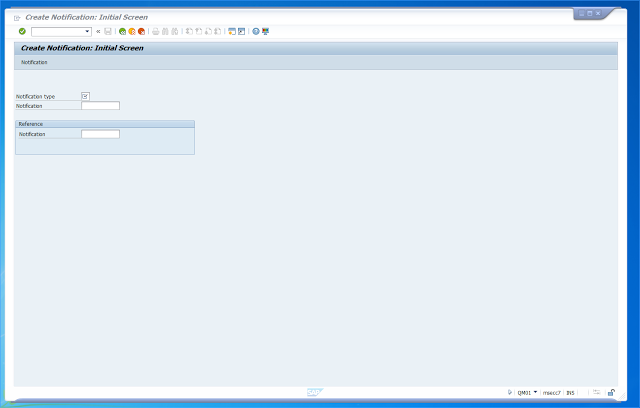
Notice that now we are logged in directly to the t-code without any prompt for username / password.
Hopefully with this — we can all finally get closer to making the move to SAP Fiori.
If you like what you see, please see our Fiori implementation package here: https://www.mindsetconsulting.com/what-we-offer/sap-technical-experience/fiori/
If you are interested in viewing similar articles, visit our blog, here.
View our LinkedIn, here.