
Principal Propagation
Salesforce → SAP BTP API Management → S/4HANA Cloud
1. Why Principal Propagation Matters?
Usecase: Imagine your company uses Salesforce for sales and SAP S/4HANA for order management. A sales rep named Jane logs into Salesforce and creates a sales order. Behind the scenes, Salesforce calls an API to push that order into S/4HANA. But here’s the problem:
Without Principal Propagation: The API call hits S/4HANA using a single “technical user”, so every action looks like it was done by that one generic account. Jane’s name never shows up. You lose the audit trail, and you can’t enforce user-specific permissions.
With Principal Propagation: Jane logs into Salesforce once, and that’s it. She never has to log into BTP or S/4HANA separately. Her identity (her email) is silently carried along with the API call, all the way from Salesforce through API Management into S/4HANA. S/4HANA sees “Jane” not a generic bot. Her permissions apply, and the audit log shows her name. All of this happens behind the scenes with zero extra effort from Jane.
2. The Big Picture -> End-to-End Flow
Here’s what happens behind the scenes when a Salesforce user triggers an API call to S/4HANA. Remember the user only logs into Salesforce. Everything below happens automatically and invisibly.

- Salesforce
User is already logged into Salesforce. They click a button or trigger an action. Salesforce automatically sends an API request with the user’s email in a custom header (X-User-Email). No extra login needed. - API Management (Proxy Endpoint)
Verifies the OAuth token (from Salesforce app) and extracts the user’s email from the X-User-Email header. - API Management (Target Endpoint)
Builds a SAML assertion with that user’s email as the Subject. Signs it with a certificate. Base64-encodes it. - BTP XSUAA
API Mgmt exchanges the SAML assertion for an OAuth token from XSUAA (SAP’s identity service) using the SAML2 Bearer grant. - API Management
Receives the user-specific OAuth token and attaches it to the outbound request as SAP-Connectivity-Authentication header. - Cloud Connector → S/4HANA
Cloud Connector forwards the request to S/4HANA. S/4HANA sees the token, resolves the user, and applies their permissions.
3. Prerequisites — What You Need Before Starting
SAP BTP Subaccount
→ With API Management capability enabled.
S/4HANA System
→ Accessible via Cloud Connector. OData service exposed.
Cloud Connector
→ Configured and connected to your BTP subaccount, mapping to the S/4HANA backend.
XSUAA Service Instance
→ A service instance in BTP. You need the client_id, client_secret, audience(SAP Cloud Foundry tenant UAA) and token endpoint URL from SAML metadata (AssertionConsumerService).
Certificate (KeyStore)
→ A signing certificate uploaded to API Management for signing SAML assertions.
Identity Provider Trust
→ XSUAA must trust the API Management IDP (e.g., “apim.proxy.idp”) as a SAML identity provider.
Salesforce Setup
→ Named Credentials / Apex HTTP callout configured to send X-User-Email header with the logged-in user’s email + OAuth token for API Mgmt.
Principal propagation setup between cloud connector and s/4hana
→ Setting up Principal Propagation step-by-step from SAP Cloud Connector SAP Note :3452851
User Mapping
→ Each Salesforce user’s email must map to a valid user in S/4HANA (same email or mapped via IDP).
4. Building the API Proxy — Step by Step
Build an API Proxy in SAP API Management that handles the full principal propagation flow.
4.1 Create the API Proxy
Go to the API Management portal in SAP BTP. Create a new API Proxy with the following settings:
| Field | Value |
| Proxy Name | Choose a descriptive name for your proxy (e.g my-api-proxy) |
| Service Type | REST |
| Base Path | /your-base-path (the path consumers will use to call your API) |
| API Provider | your Cloud Connector provider |
| Target Path | /sap/opu/odata/sap/YOUR_BACKEND_SERVICE/ (the actual backend OData or REST service) |
4.2 Proxy Endpoint — PreFlow Policies (Incoming Request)
These policies run first, when the request arrives at API Management from Salesforce. They validate the caller and extract the user’s identity.

Policy 1: VerifyOAuth
This policy verifies the OAuth access token that Salesforce sends. It ensures only authorized Salesforce apps can call this API.
What it does: Checks the Bearer token in the Authorization header. If invalid or expired, the request is rejected immediately.

Policy 2: Extract-PropagatedUser
This is where the magic starts. This policy reads the user’s email from a custom HTTP header sent by Salesforce.
What it does: Extracts the value of the “X-User-Email” header and stores it in a variable called sapapim.username. This variable follows the request through the entire flow.

4.3 Target Endpoint — PreFlow Policies (Before Calling S/4HANA)
These policies run after the proxy endpoint and before the actual call to S/4HANA. This is where the SAML assertion is built and exchanged for an OAuth token. The execution order (by sequence number) is critical:

- setSAMLAssertionValues (JavaScript)
Set all SAML variables, including timestamps, issuer, audience, and credentials. - generatesamlassertion (GenerateSAMLAssertion)
Build and sign the SAML XML assertion. - removeXmlRootTagFromAssertion(JavaScript)
Strip the XML declaration from the assertion. - encodeSAMLResponse (Python Script)
Base64-encode the SAML assertion. - createOAuthRequest (JavaScript)
Build the OAuth token request form body. - getOAuthToken (ServiceCallout)
POST the SAML assertion to XSUAA to exchange it for an OAuth token. - raiseTokenError (RaiseFault)
If the token call fails (non-200 response), raise an error. - readAccessToken (ExtractVariable)
Extract the access_token from the XSUAA response. - setAccessToken (AssignMessage)
Set the SAP-Connectivity-Authentication header with the retrieved access token.
Policy 1: setSAMLAssertionValues (JavaScript)
This JavaScript policy is the brain of the operation. It sets every variable needed to construct the SAML assertion. Here’s what each variable means:
| Variable | What It Is / Where It Comes From |
| sapapim.timestamp | Current server time becomes the SAML IssueInstant |
| sapapim.notBefore | Start of SAML validity (e.g.,10 minutes before current time) |
| sapapim.notOnorAfter | End of SAML validity (e.g.,10 minutes after current time) |
| sapapim.issuer | Name of the IDP trusted by XSUAA (e.g., “apim.proxy.idp”) |
| sapapim.audience | XSUAA tenant URL , the intended recipient of the assertion |
| sapapim.recipient | XSUAA token endpoint alias, where the assertion is sent |
| sapapim.username | User’s email or UPN (extracted dynamically, not hardcoded) |
| sapapim.storename | Keystore name used to sign the assertion |
| sapapim.keyname | Key alias inside the keystore |
| sapapim.clientId | OAuth client ID from XSUAA service key |
| sapapim.secret | OAuth client secret from XSUAA service key |
Policy 2: generatesamlassertion (Generate SAML Assertion)
This built-in SAP policy takes all the variables from Step 1 and constructs a proper SAML 2.0 XML assertion, then signs it using the certificate from the keystore.
What it produces: A signed SAML XML document with the user’s email as the Subject, the issuer, audience, timestamps, and group attributes. The signed assertion is stored in sapapim.assertion.
Policy 3: removeXmlRootTagFromAssertion (JavaScript)
A small cleanup step. The generated assertion has an XML declaration (<?xml version=”1.0″…?>) at the top that needs to be removed before encoding.

Policy 4: encodeSAMLResponse (Python Script)
Base64-encodes the SAML assertion. XSUAA expects the assertion to be Base64-encoded in the token request body.

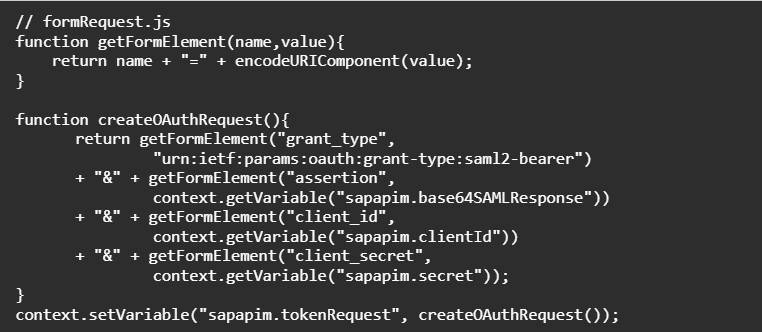
Policy 5: createOAuthRequest (JavaScript)
Builds the HTTP form body for the OAuth token request. This assembles the grant_type, assertion, client_id, and client_secret into URL-encoded form format.
Policy 6: getOAuthToken (ServiceCallout)
This is the critical network call. It POSTs the SAML2 Bearer token request to XSUAA’s token endpoint and stores the response.

Policy 7: raiseTokenError (RaiseFault)
A safety net. If the XSUAA token call returns anything other than HTTP 200, this policy stops the flow and returns the error to the caller. It only fires when the condition sapapim.tokenResponse.status.code != 200 is true.

Policy 8: readAccessToken (ExtractVariable)
Extracts the access_token from the JSON response returned by XSUAA.

Policy 9: setAccessToken (AssignMessage)
The final step! This policy sets the user-specific OAuth token on the outbound request to S/4HANA using the SAP-Connectivity-Authentication header. Cloud Connector and S/4HANA use this header to identify and authorize the real user.

API Provider – Authentication
Authentication: NONE Catalog Authentication Type: NOAUTH
Why? No static credentials are needed at the provider level, authentication is handled dynamically by the API Proxy via principal propagation.
5. Testing the Flow
Once the proxy is deployed, test the full flow:
5.1 Test with API Test Console / Postman
Send a request to your API proxy base path with the required headers:

5.2 Verify in S/4HANA
Check the S/4HANA change logs or transaction SLG1 to confirm the action was recorded under the propagated user’s identity (e.g., Jane@yourcompany.com) and not a technical user.
5.3 Test from Salesforce
Trigger the actual Salesforce flow (button click, Apex trigger, etc.) and verify the same result. The Salesforce callout should automatically inject the logged-in user’s email into the X-User-Email header.
🎉That’s It!
Your Salesforce users now execute actions in S/4HANA under their own identity with just one login.
Useful Links:
SAP Note :3452851 Setting up Principal Propagation step-by-step from SAP Cloud Connector
Help.sap-saml-assertion-policy
https://api.sap.com/policytemplate/Principal_Propagation_via_SAML
