
In most organizations, customers are not just individual entities; they often exist within a structured relationship. For example, a global customer group may have multiple regional subsidiaries or local branches, such as McDonald’s Global, McDonald’s APAC, McDonald’s India, and so on.
Understanding this structure is critical for accurate reporting, performance tracking, and decision-making. This is where hierarchies in SAP Datasphere come into play. They help you to represent parent-child relationships between entities such as customers, materials, cost centers, or organizational units – enabling a clear view of data across multiple levels. Let’s have a brief on types of hierarchies and then how we had built customer hierarchies in Datasphere.
Types of Hierarchies in SAP Datasphere
SAP Datasphere supports several hierarchy types to handle different business scenarios. There are three different types of hierarchies in Datasphere. Let’s have an overview of each one and also when to use each.
Parent Child Hierarchy
It is used when the number of levels in the hierarchy is not fixed. Relationships are maintained in one entity. Hierarchy can change over time, and you want to adapt to these changes; a simple example can be manager employee hierarchy.
Level-based Hierarchy
Each Level in the Hierarchy has a separate column. Your hierarchy has a fixed number of levels. Here, you lose flexibility, if the number of levels in the hierarchy is increased or decreased. A simple example can be year, month, day hierarchy.
Hierarchy with Directory
This is used when you have multiple hierarchies for the same base entity. Going forward, you can switch between them. You want to store and manage several hierarchies centrally for the same entity simple example can be GL Account hierarchy showing according to different version.
The Challenge:
Modeling Customer hierarchies in SAP Datasphere helps overcome these challenges by enabling parent-child relationships that connect these scattered entities under a single, logical structure, ensuring multi-level analytics across the organization.
Another challenge was with the keys. Representative key is required to be defined in the dimension. There should be one unique key in the entity that represents a single node in the hierarchy and would also be a representative key.
The Solution:
When modeling customer relationships that span multiple sales organizations, distribution channels, and divisions, flexibility was a key.
A Parent-Child Hierarchy would be ideal for this scenario because it allows you to define relationships dynamically, without being constrained by a fixed number of hierarchy levels. Each record simply defines who the child is and who the parent is.
Level hierarchy would not be ideal because in this case, the number of levels is not fixed, and a Hierarchy with Directory also would not be appropriate, as we don’t have multiple versions. Hence, we decided the first step is to flatten these relationships, wherein each row should be able to identify the child and parent.
1. Flattening the Structure
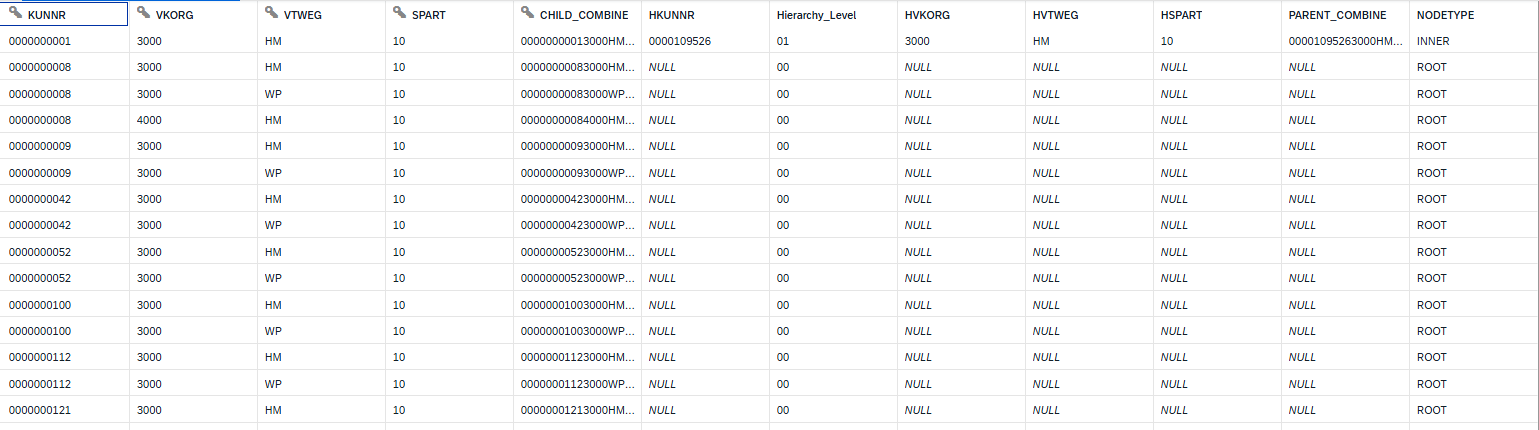
The base data was transformed by concatenating key attributes Customer, Sales Organization, Distribution Channel, and Division into a single composite field. This field was labelled as child_combine, uniquely identifying each customer relationship across different business dimensions. Child was defined as key attribute and it would also work as a representative key as it identifies single nodes in hierarchy.
Similarly, the corresponding parent_combine field was created in the same dataset to represent the higher-level customer entity. This approach ensured both the child and parent nodes existed within the same record, simplifying the modeling process in Datasphere.
I will not go into deep technical things here, but we have used a set of views, data flows and task chains to deliver this. Below is a snippet of the flattened structure. As this is master data and would not be changing too frequently, we had scheduled the task chain.
2. Building the Hierarchy
Once the flattened structure was prepared, a Parent–Child Hierarchy was modelled within SAP Datasphere. This hierarchy defined the relationships between child entities and their parent entities. This Dimension hierarchy was mapped with a Fact View which in turn was used in Analytical Model and consumed in SAP Analytics Cloud.
Below is dependency view for the objects developed:

Impact:
By flattening the structure and combining key attributes, we established a solid foundation for hierarchy modeling. It allows business users to analyze data seamlessly across multiple levels, from global accounts down to local branches.
SAP Datasphere provided different ways to build different types of hierarchy, each with its own purpose. This approach demonstrates one effective way to model customer hierarchies in SAP Datasphere, though the platform offers other flexible methods depending on business requirements.
Interested in learning more?
Visit Mindset’s Linkedin
Visit Mindset’s Blog Library
Visit Mindset’s YouTube Page